Key takeaways
- Compare the best home wifi range extenders for dead zones: three dual-band picks compared on coverage, device support, mesh features and Ethernet ports.
A WiFi range extender takes the signal your router already broadcasts and repeats it into the rooms where that signal fades: the back bedroom, the home office at the end of the hall, the garage workbench. It does not make your internet plan faster, and it cannot fix a weak connection at the router itself. What it can do is close the gap between a strong signal in the living room and a stalled video call two walls away, without running cable or replacing your whole network.


This guide is for households that have one or two problem rooms rather than a whole house to rewire. The three extenders below were chosen from their Amazon listing names and published specifications only: rated coverage area, device count, band speeds, antenna setup, Ethernet ports, and mesh compatibility. All three are dual-band AC-class wall-plug or compact units, so the real differences come down to how much space each one claims to cover, how many devices it is rated for, and whether it can join a mesh system later.
Quick Picks
Our Short List of 3
- Best for: Smaller homes and apartments with one problem room, especially if you already own or plan to buy a OneMesh or EasyMesh TP-Link router.
- Brand: TP-Link
- Model Number: RE315
- WiFi standard: AC1200 dual band (5GHz and 2.4GHz)
- Rated speed: up to 1.2Gbps combined
- Best for: Larger homes, heavier streaming and gaming loads in the extended zone, and anyone who wants a gigabit wired port for a console or desktop.
- Brand: TP-Link
- Model Number: RE550
- WiFi standard: AC1900 dual band
- Rated speed: 1,300Mbps (5GHz) plus 600Mbps (2.4GHz)
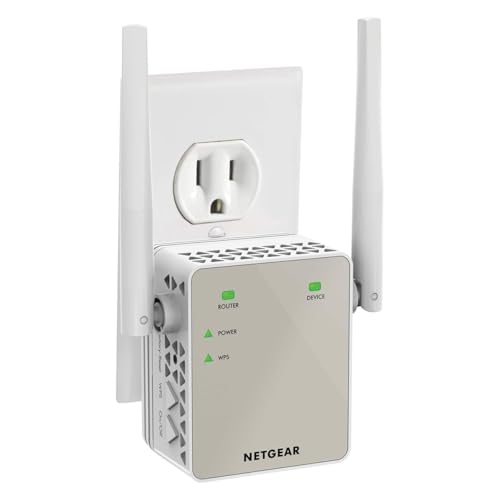
- Best for: A single dead room where you want the simplest possible setup, and households already using NETGEAR networking gear.
- Brand: NETGEAR
- Model Number: EX6120-100NAS
- WiFi standard: AC1200 dual band
- Rated speed: up to 1.2Gbps combined
All 3 Picks at a Glance
| Product | Specs | Action |
|---|---|---|
| TP-Link AC1200 WiFi Extender RE315 |
| Check price on Amazon |
| TP-Link AC1900 WiFi Range Extender RE550 |
| Check price on Amazon |
| NETGEAR WiFi Range Extender EX6120 |
| Check price on Amazon |
How to Choose
Coverage rating and placement
Every extender lists a maximum coverage area, and that number assumes reasonable placement. An extender works by receiving your router’s signal and rebroadcasting it, so it needs to sit where the original signal is still decent, roughly halfway between the router and the dead zone. Placed inside the dead zone itself, it has nothing strong to repeat. The ratings in this guide run from 1,500 to 2,200 square feet of added coverage, which suits apartments and single-floor problem areas more than multi-storey houses with several dead rooms. Treat the rating as a ceiling, not a promise, and plan the outlet position before you buy.
Dual-band speeds and what they mean
All three picks are dual-band, splitting traffic between a 2.4GHz band that travels farther through walls and a 5GHz band that carries higher speeds over shorter distances. The AC1200 models are rated up to 1.2Gbps combined, while the AC1900 model splits its rating into 1,300Mbps on 5GHz and 600Mbps on 2.4GHz. Keep in mind that an extender shares its wireless link with your devices, so real throughput to a laptop or TV will be lower than the headline figure. For browsing, streaming, and video calls in one or two rooms, AC1200 class hardware is generally enough; the higher AC1900 rating matters more when several people stream or game at once through the same extender.
Device count and Ethernet ports
Manufacturers rate extenders for a maximum number of connected devices, here between 25 and 32. That count includes phones, tablets, smart plugs, cameras, and everything else that quietly stays connected, so a smart home fills it faster than you might expect. Each of these extenders also has one Ethernet port, which lets you wire a stationary device such as a desktop, a TV, or a games console directly into the extender instead of relying on its repeated wireless signal. Port speed differs, though: one model here has a gigabit port, while the others use standard or 10/100 ports, which caps the wired speed for that connected device.
Mesh compatibility and setup style
A standalone extender usually creates a second network name, so your phone may cling to the router’s signal as you move rooms. Mesh-compatible extenders avoid that by working under one network name when paired with a compatible router. Two of the picks below support EasyMesh, and one of those also supports OneMesh, which matters if you already own or plan to buy a matching TP-Link router. Setup style differs too: app-guided setup walks you through placement and passwords, while a WPS push-button setup pairs the extender with a button press on the router. Neither is difficult, but the app route gives you more control over settings afterwards.
The 3 Best Options
TP-Link AC1200 WiFi Extender RE315
- Best for: Smaller homes and apartments with one problem room, especially if you already own or plan to buy a OneMesh or EasyMesh TP-Link router.
- Brand: TP-Link
- Model Number: RE315
- WiFi standard: AC1200 dual band (5GHz and 2.4GHz)
- Rated speed: up to 1.2Gbps combined
Smaller homes and apartments with one problem room, especially if you already own or plan to buy a OneMesh or EasyMesh TP-Link router.
The 1,500 square foot rating is the joint-smallest in this guide, and with a single Ethernet port and no external antennas it is built for convenience rather than maximum reach.
The RE315 is the straightforward pick for a single dead zone in an apartment or smaller house. It is a wall-plug unit, so it sits directly in an outlet with no shelf or desk space needed, and its AC1200 dual-band radio is rated to add up to 1,500 square feet of coverage for up to 30 devices. That device count is generous for this class and suits a household where phones, laptops, and a few smart devices all drift into the weak-signal room.
Its most useful long-term feature is mesh support: the RE315 works with both OneMesh and EasyMesh, so if you pair it with a compatible TP-Link router it can share one network name instead of forcing you onto a separate extended network. The single Ethernet port gives you a wired option for one stationary device, such as a TV or a desktop in the room the extender serves.
Watch out for: The 1,500 square foot rating is the joint-smallest in this guide, and with a single Ethernet port and no external antennas it is built for convenience rather than maximum reach.
TP-Link AC1900 WiFi Range Extender RE550
- Best for: Larger homes, heavier streaming and gaming loads in the extended zone, and anyone who wants a gigabit wired port for a console or desktop.
- Brand: TP-Link
- Model Number: RE550
- WiFi standard: AC1900 dual band
- Rated speed: 1,300Mbps (5GHz) plus 600Mbps (2.4GHz)
Larger homes, heavier streaming and gaming loads in the extended zone, and anyone who wants a gigabit wired port for a console or desktop.
It is the largest unit here thanks to its three external antennas, and its EasyMesh support does not include OneMesh, so check your router’s mesh system before counting on a single network name.
The RE550 is the step-up option in this group, with an AC1900 dual-band radio rated at 1,300Mbps on the 5GHz band and 600Mbps on the 2.4GHz band. Its stated coverage reaches up to 2,200 square feet for up to 32 devices, the highest figures here, which makes it the natural choice for a larger home or a household where the extended zone carries a lot of simultaneous traffic.
Three external antennas give you some ability to aim the signal, something the internal-antenna wall-plug models cannot do. The gigabit Ethernet port is the fastest wired connection in this guide, and the RE550 can also run in AP mode, turning a wired network connection into a wireless access point if your layout changes. EasyMesh compatibility keeps the single-network-name option open with a compatible router.
Watch out for: It is the largest unit here thanks to its three external antennas, and its EasyMesh support does not include OneMesh, so check your router’s mesh system before counting on a single network name.
NETGEAR WiFi Range Extender EX6120
- Best for: A single dead room where you want the simplest possible setup, and households already using NETGEAR networking gear.
- Brand: NETGEAR
- Model Number: EX6120-100NAS
- WiFi standard: AC1200 dual band
- Rated speed: up to 1.2Gbps combined
A single dead room where you want the simplest possible setup, and households already using NETGEAR networking gear.
The 25-device rating is the lowest here, the 10/100 Ethernet port limits wired speed, and there is no mesh compatibility, so it will run as a separate extended network.
The EX6120 is NETGEAR’s compact take on the AC1200 extender: a small wall-plug body rated to add up to 1,500 square feet of coverage for up to 25 devices at up to 1.2Gbps across its dual bands. It suits a single stubborn room, such as a bedroom where video calls drop or a kitchen where a smart display keeps buffering.
Setup leans on WPS Push N Connect, so pairing can be as simple as pressing the WPS button on your router and then on the extender. NETGEAR’s FastLane technology is designed to use both bands together to improve the link for streaming and gaming traffic. The single Ethernet port is a 10/100 port, fine for a TV or printer, though it caps the wired speed for anything faster.
Watch out for: The 25-device rating is the lowest here, the 10/100 Ethernet port limits wired speed, and there is no mesh compatibility, so it will run as a separate extended network.
Which One Fits Your Situation
One dead bedroom or office in a flat or small house
Choose the TP-Link RE315. Its 1,500 square foot rating and 30-device support cover a single problem room comfortably, the wall-plug body disappears into an outlet, and its OneMesh and EasyMesh support gives you a cleaner upgrade path if you later switch to a compatible router.
A bigger house with several people streaming at once
Choose the TP-Link RE550. The 2,200 square foot rating, AC1900 speeds, and three adjustable external antennas are built for exactly this load, and the gigabit Ethernet port lets the most demanding device in the room, usually a console or a work desktop, bypass the wireless hop entirely.
The simplest setup for a non-technical household
Choose the NETGEAR EX6120. WPS Push N Connect pairing avoids apps and passwords during setup, the compact body fits almost any outlet, and its AC1200 radio is enough for one room’s browsing, streaming, and calls. Just keep its 25-device ceiling in mind if the home is full of smart gadgets.
Common Mistakes
- Placing the extender inside the dead zone, where the router signal it repeats is already too weak to be useful.
- Expecting an extender to increase your internet plan speed; it only redistributes the connection you already have.
- Covering a whole multi-storey house with one small extender instead of planning one unit, or a mesh system, per problem area.
- Ignoring the device rating and connecting a large smart home through a unit rated for fewer devices than you own.
- Forgetting that a non-mesh extender creates a separate network name, so devices may not switch over automatically as you move around.
Frequently Asked Questions
Will a range extender make my internet faster?
No. An extender repeats your existing WiFi signal into areas where it is weak, so a device in a former dead zone gets a usable connection, but your maximum speed is still set by your internet plan and your router. In the extended zone, speeds are typically lower than near the router because the extender shares its wireless link between receiving and sending.
Where should I place a WiFi range extender?
Place it roughly halfway between your router and the dead zone, in a spot where the router’s signal is still reasonably strong. Too close to the router and it adds little new coverage; too far and it repeats a weak signal. Most extenders and their apps show signal indicators to help you find that middle position.
What is the difference between an extender and a mesh system?
A standalone extender creates a second network that repeats the first, and your devices may hold onto the weaker signal as you move. A mesh system uses multiple nodes designed to work together under one network name with automatic handover. Mesh-compatible extenders such as the RE315 and RE550 bridge the two approaches when paired with a compatible router.
How many devices can one extender handle?
It depends on the model. The extenders in this guide are rated for 25 to 32 devices. That count includes everything connected through the extender, not just the devices you actively use, so count smart bulbs, plugs, and cameras as well as phones and laptops when you compare ratings.
Related guides
- Best portable chargers and power banks for phones
- Best home security cameras and doorbell
- Best 21 24 inch monitors
As an Amazon Associate, we earn from qualifying purchases.