Our Short List of 3
All 3 Picks at a Glance
| Product | Specs | Action |
|---|---|---|
 1. Cooler Master N200 Mini Tower |
| Check price on Amazon |
 2. Rosewill FBM-01 Micro ATX Mini Tower |
| Check price on Amazon |
 3. SilverStone Grandia GD09B HTPC Desktop |
| Check price on Amazon |
Key takeaways
- The best small PC cases with a disc drive bay, from a micro ATX mini tower to a slim HTPC desktop, with bay counts, board support, and clearances compared.
As an Amazon Associate we earn from qualifying purchases.
Most compact cases sold today have dropped the optical drive bay entirely. The front panels are sealed for airflow or glass, and there is simply no opening for a DVD or Blu-ray drive. That is a problem if you still rip discs, install software from physical media, burn backups, or run a home theater PC that plays Blu-ray movies. The good news is that a small number of compact cases still include a proper external 5.25-inch bay. This guide covers three of them: a micro ATX mini tower from Cooler Master, a steel mini tower from Rosewill with two external bays, and a low-profile HTPC desktop from SilverStone that slides into a media cabinet. Every case below has a page-stated 5.25-inch external drive bay, and every one is a genuinely compact design rather than a full-size tower.
Disclosure: This article contains affiliate links. If you buy through these links, we may earn a commission at no additional cost to you.
How to Choose a Small PC Case with a Disc Drive
Confirm the bay is external and full size. The keyword that matters is an external 5.25-inch bay. Some compact cases list internal 5.25-inch mounting points or slim optical support, which are not the same thing. A standard desktop DVD or Blu-ray drive needs a full external 5.25-inch bay with a front opening. All three cases in this guide state an external 5.25-inch bay in their specifications.
Match the motherboard form factor. Compact cases split into mini-ITX, micro ATX, and HTPC desktop designs that may also accept full ATX boards. Check that the case supports your board size before anything else, because a smaller case cannot be stretched later. The Cooler Master and Rosewill below take micro ATX and mini-ITX boards, while the SilverStone desktop also accepts full ATX.
Check drive bay totals, not just the optical bay. A build with an optical drive usually also needs storage. Look at how many 3.5-inch and 2.5-inch mounts remain after the optical drive goes in, and whether the 5.25-inch bay can convert to hold a smaller drive when you no longer need the disc drive.
Mind the clearances. Small cases limit graphics card length and CPU cooler height. If you plan a gaming build, confirm the maximum card length. If the PC is for a living room, measure the cabinet shelf height and depth first, because HTPC desktops are wide and low rather than tall.
Think about airflow and noise. A mesh front panel moves more air and suits a work or gaming build. A closed, finished front panel looks better in a living room and can run quieter at idle. Pick based on where the PC will live.
Plan the front panel layout. An optical drive takes the bay, but what sits around it matters too. Front USB ports and audio jacks are easier to reach on a desk build, while a living-room build benefits from a clean, unbroken front. Also check whether the bay cover matches the case finish; on cases with a mesh or finished front, the drive’s own bezel becomes part of the look, and most drives ship with a black bezel that suits the black cases in this guide.
Leave room for the drive’s depth and cabling. A 5.25-inch bay is a standard width and height, but cases differ in how much depth sits behind it before the motherboard or power supply cables arrive. Standard optical drives are roughly 170mm deep or less, which is exactly the maximum device length Cooler Master states for the N200. In a top-mounted power supply layout like the Rosewill FBM-01, route the SATA power and data cables before sliding the drive fully home, because access gets tight once the supply is in place.
The Best Small PC Cases with Disc Drive
1. Cooler Master N200 Mini Tower
The Cooler Master N200 is a mini tower for micro ATX and mini-ITX motherboards, and it keeps a single external 5.25-inch bay at the top of its fully meshed front panel. Cooler Master’s specification lists one 5.25-inch drive bay with a maximum device length of 170mm, which covers standard DVD and Blu-ray drives. Below the bay, the case holds up to three 3.5-inch drives and four 2.5-inch drives, so a typical build can combine the optical drive with a hard drive for media storage and an SSD for the operating system.
Cooling is a strength at this size. The mesh front supports a 240mm radiator, and the case fits graphics cards up to 355mm long and CPU coolers up to 160mm tall, which is generous for a mini tower. There are four expansion slots, a bottom-mounted power supply position, and front USB 3.0 connectivity. The footprint is 202mm wide, 378mm tall, and 445mm deep, and the case weighs 9.5 pounds. If you want one compact case that can serve as a small gaming or workstation build and still take a disc drive, the N200 is the most flexible option here.
2. Rosewill FBM-01 Micro ATX Mini Tower
The Rosewill FBM-01 is a steel micro ATX mini tower that stands out for one reason: it has two external 5.25-inch bays, the most of any case in this guide. That makes it the natural pick for a build that needs an optical drive plus a second front device, such as a card reader, a fan controller, or a second optical drive for disc-to-disc work. It also provides one external 3.5-inch bay and two internal 3.5-inch bays.
The FBM-01 comes with a 120mm front fan and an 80mm rear fan pre-installed, so cooling is handled out of the box for office and home builds. The front panel carries two USB 2.0 ports and audio in and out. The power supply mounts at the top in the traditional layout, and the case supports standard ATX power supplies. At roughly 13.9 inches tall, 6.9 inches wide, and 13.8 inches deep, it is the smallest footprint in this guide, and it supports graphics cards up to 300mm long. For a compact office or family PC that still reads and burns discs, this is the straightforward choice.
3. SilverStone Grandia GD09B HTPC Desktop
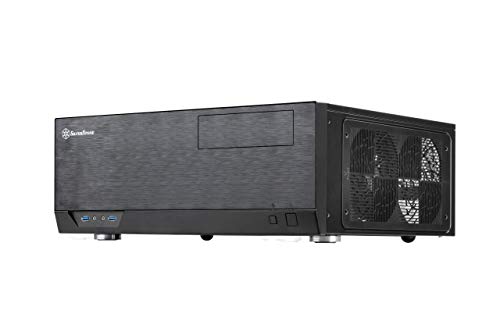
The SilverStone Grandia GD09B takes a different approach to small. Instead of a tower, it is a low desktop case, 440mm wide, 170mm tall, and 358mm deep, designed to sit in a home theater cabinet where a tower would never fit. SilverStone states that the design fits full-size components including an ATX power supply, an ATX motherboard, and a 5.25-inch drive, and the specification lists one external 5.25-inch bay that is also compatible with a 3.5-inch device or two 2.5-inch devices. Inside there are mounts for two 3.5-inch drives and one 2.5-inch drive.
Despite the living-room shape, the GD09B accepts SSI-CEB, ATX, and micro ATX motherboards, graphics cards up to 12.2 inches long, and CPU coolers up to 138mm tall. The front panel has two USB 3.0 ports plus audio and microphone jacks, and the chassis combines a steel body with a faux aluminum front finish in black. It weighs 4.2kg. If your disc drive exists to play movies or rip a media library, this is the case that puts the drive in the room where the discs actually are.
Comparison Table
| Case | Form factor | Motherboards | External 5.25-inch bays | Other drive mounts | Max graphics card | Dimensions |
|---|---|---|---|---|---|---|
| Cooler Master N200 | Mini tower | Micro ATX, Mini-ITX | 1 | 3 x 3.5-inch, 4 x 2.5-inch | 355mm | 202 x 378 x 445mm |
| Rosewill FBM-01 | Mini tower | Micro ATX | 2 | 1 x 3.5-inch external, 2 x 3.5-inch internal | 300mm | 13.9 x 6.9 x 13.8 in |
| SilverStone Grandia GD09B | HTPC desktop | SSI-CEB, ATX, Micro ATX | 1 | 2 x 3.5-inch, 1 x 2.5-inch | 12.2 in | 440 x 170 x 358mm |
Frequently Asked Questions
Why do so few small cases have a disc drive bay?
Case makers removed external bays to improve front airflow, fit larger radiators, and simplify front panels. Demand for optical drives also fell as software and media moved to downloads. The cases that remain with a 5.25-inch bay are mostly designs that have been in production for years, which is why checking the bay in the specification still matters.
Can I fit a Blu-ray drive in these cases?
Yes. A Blu-ray drive uses the same standard 5.25-inch form factor as a DVD drive. Each case here lists an external 5.25-inch bay, and the Cooler Master N200 states a maximum device length of 170mm, which suits standard optical drives. Just confirm your specific drive’s depth against the case specification before ordering.
What if I stop using the disc drive later?
The bay does not go to waste. The SilverStone GD09B’s 5.25-inch bay is specified as compatible with a 3.5-inch device or two 2.5-inch devices, and adapter brackets can also turn a 5.25-inch bay into a home for a card reader or extra storage. The Rosewill FBM-01, with two bays, lets you convert one and keep the other for optical media.
Is a mini tower or an HTPC desktop better for a living room?
An HTPC desktop like the GD09B is shaped like other media components, so it fits a cabinet shelf and looks at home under a television. A mini tower is easier to build in and usually cools better, but it needs vertical space. Measure the shelf first; the GD09B is 170mm tall and 358mm deep, which suits most media furniture.
Do these cases include the optical drive?
No. All three are cases only, and no power supply is included either. You supply the optical drive, motherboard, and other components. The Rosewill FBM-01 does include two case fans, and the Cooler Master N200 includes front and rear fans as part of its standard configuration.
Conclusion
A compact case with a real disc drive bay is a narrow category, but the three options here cover the main ways people build such a PC. The Cooler Master N200 is the best all-rounder, pairing one 5.25-inch bay with strong cooling and long graphics card support in a mini tower. The Rosewill FBM-01 is the pick when two external bays matter, and its small footprint suits office and family builds. The SilverStone Grandia GD09B is the living-room option, a low HTPC desktop that takes a full ATX board and a 5.25-inch drive inside a media cabinet. Measure your space, confirm your board size, and any of the three will keep your discs in use.