Our Short List of 3

- Best for: recording and mixing at a desk that doubles as a gaming setup.
- 3.5-inch drivers in a wired pair
- Compact wired desktop speakers
- Recording, mixing, and multimedia use
- Music production software suite included

- Best for: a low-cable desktop setup with lighting that matches a gaming desk.
- Computer speakers for desktop use
- Touch lights
- USB-C and USB powered
- AUX audio input
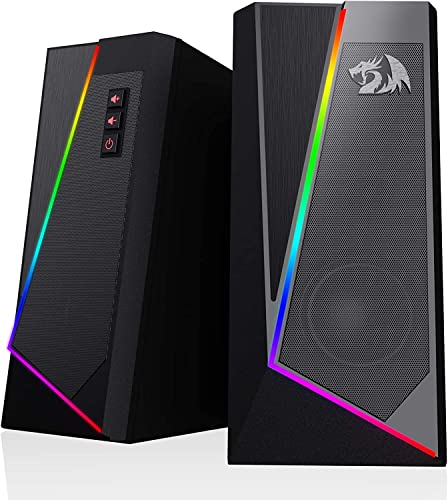
- Best for: a fixed gaming desk where a wired pair never needs to move.
- Wired 2.0 channel stereo sound
- Desktop RGB computer speakers
- Stereo pair form
All 4 Picks at a Glance
| Product | Specs | Action |
|---|---|---|
| M-AUDIO BX3 |
| Check price on Amazon |
| LENRUE G11 |
| Check price on Amazon |
| Redragon GS520 |
| Check price on Amazon |
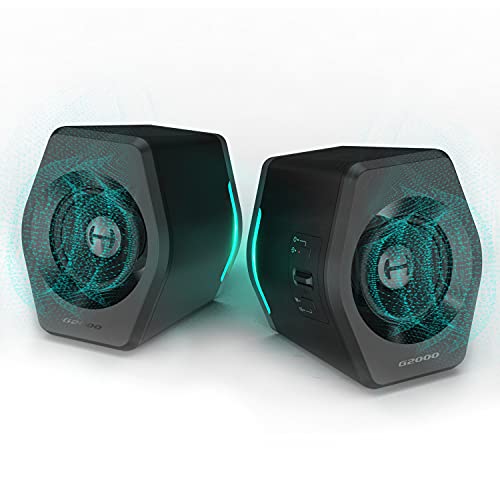 Edifier G2000 |
| Check price on Amazon |
Key takeaways
- Compare five desktop PC speakers for an Alienware monitor setup, from a compact soundbar to RGB stereo pairs, with connection and placement guidance.
An Alienware monitor usually sits at the centre of a gaming desk, and the speakers beside it should match that setup: compact enough to flank a wide screen, connected in a way that suits a PC, and easy to control without reaching behind the display. The five speakers below were chosen from listings that state desktop, PC, or computer use in their own wording, so each one is framed for life beside a monitor rather than across a living room.
One limit deserves stating plainly. No listing in this roundup states the Alienware name, and none states monitor use word for word. Every pick rests on stated PC, desktop, or computer wording in its listing, and the Alienware-monitor framing rests on that desk setup: standard PC connections such as USB, 3.5mm AUX, and Bluetooth, used with a monitor and a PC. Check the connection your own setup offers before choosing.
Quick Picks
As an Amazon Associate we earn from qualifying purchases.
| Product | Best for | Key spec from title |
|---|---|---|
| M-AUDIO BX3 | Recording and mixing at a desk | 3.5-inch wired desktop pair with software suite |
| Razer Leviathan V2 X | A compact soundbar under a monitor | Full-range drivers, USB-C, Bluetooth 5.0 |
| LENRUE G11 | Touch-light desktop speakers | USB-C and USB powered, AUX audio, touch lights |
| Redragon GS520 | Wired RGB desktop stereo | Wired 2.0 channel stereo with RGB lighting |
| Edifier G2000 | Gaming sound with wide inputs | 32W, Bluetooth, USB, 3.5mm AUX, RGB lights |
How to Choose
Match the connection to your setup
Start with how sound leaves your PC and reaches the speakers. Some listings state USB power and audio, some state a 3.5mm AUX input, and some state Bluetooth, and the right choice depends on which outputs your PC and monitor actually offer. A monitor with no audio output cannot feed wired speakers on its own, so in that case the speakers connect to the PC instead. Bluetooth removes the cable entirely but adds pairing and charging or power considerations. Read the stated inputs in the listing, match them against the ports you have, and do not assume a connection exists because a similar model offers it.
Decide between a stereo pair and a soundbar
A stereo pair places one speaker on each side of the monitor, which suits desks with room to spare and listeners who want clear left and right separation. A soundbar sits in one bar under the screen, which suits narrow desks and setups where a single unit keeps the surface tidy. The trade is separation against simplicity: two speakers spread the sound wider, while one bar keeps cabling to a single run. Measure the width under and beside your monitor first, then let the free space decide the form rather than the other way around.
Weigh wired reliability against wireless convenience
Wired speakers connect and stay connected, with no pairing step and no wireless dropouts, which suits a fixed desk where the speakers rarely move. Bluetooth speakers remove the cable between the PC and the speakers and suit setups where the audio source changes often, such as switching between a PC, a laptop, and a phone. Several listings in this roundup state both wired inputs and Bluetooth, which covers both cases in one unit. If the desk never moves and the PC never changes, a wired pair is the simpler long-term choice.
Size the speakers to the desk
Speaker size matters more on a gaming desk than in a living room, because the monitor, keyboard, and mouse already claim most of the surface. Compact pairs with smaller drivers leave room for a mouse pad and sit neatly beside a monitor stand, while larger units need clearance on both sides. The listings here state their driver sizes and forms, so compare those stated figures against the free space beside your screen. A speaker that crowds the mouse area will be moved within a week, however good it sounds.
The 5 Best Options
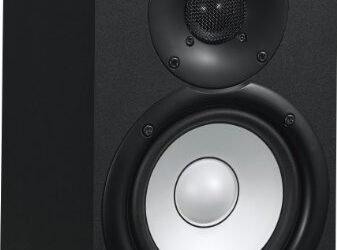
M-AUDIO BX3
- Best for: recording and mixing at a desk that doubles as a gaming setup.
- 3.5-inch drivers in a wired pair
- Compact wired desktop speakers
- Recording, mixing, and multimedia use
- Music production software suite included
recording and mixing at a desk that doubles as a gaming setup.
the listing states wired operation only, with no Bluetooth wording, so the speakers need a cable run to the PC.
The M-AUDIO BX3 is a compact wired pair built for desk work, with its listing describing desktop speakers for recording, mixing, and multimedia rather than room-filling home audio. The 3.5-inch drivers keep each unit small enough to sit beside a monitor stand, and the included music production software suite adds value for anyone who records or edits at the same desk they game at. Wired operation means there is nothing to pair and no wireless signal to manage.
Watch out for: the listing states wired operation only, with no Bluetooth wording, so the speakers need a cable run to the PC.
Razer Leviathan V2 X
The Razer Leviathan V2 X is the only soundbar in this roundup, and its single-bar form is its main argument: one compact unit under the monitor, full-range drivers, and Chroma RGB lighting that matches a gaming desk. Its listing states USB-C and Bluetooth 5.0 alongside PC, laptop, smartphone, and tablet use, so it covers both a wired desk connection and wireless switching to other devices. The compact design suits monitors with little free space on either side.
Specs
- PC soundbar with full-range drivers
- Compact design with Chroma RGB lighting
- USB-C connection
- Bluetooth 5.0
- For PC, laptop, smartphones, tablets, and Nintendo Switch
Best for: a single-bar setup under a wide monitor on a narrow desk.
Watch out for: the listing states no subwoofer, unlike the larger Leviathan V2, so deep bass rests on the bar alone.
ASIN: ⚠ B0BCCCNHD8
LENRUE G11
- Best for: a low-cable desktop setup with lighting that matches a gaming desk.
- Computer speakers for desktop use
- Touch lights
- USB-C and USB powered
- AUX audio input
a low-cable desktop setup with lighting that matches a gaming desk.
the touch-light controls sit on the speakers themselves, so the pair needs to stay within easy reach.
The LENRUE G11 is a touch-light desktop pair whose listing leads with computer and desk use, stating USB-C and USB power with AUX audio for a computer desktop, PC, or laptop. Touch lights give the pair a visible desk presence that suits a gaming setup, and USB power keeps the cable count low when the speakers draw power from the PC itself. The AUX input covers PCs whose audio output is a standard headphone-style jack rather than USB audio.
Watch out for: the touch-light controls sit on the speakers themselves, so the pair needs to stay within easy reach.
Redragon GS520
- Best for: a fixed gaming desk where a wired pair never needs to move.
- Wired 2.0 channel stereo sound
- Desktop RGB computer speakers
- Stereo pair form
a fixed gaming desk where a wired pair never needs to move.
the listing is brief, stating no Bluetooth, USB audio, or driver size, so expect a basic wired connection only.
The Redragon GS520 is a straightforward wired stereo pair: 2.0 channel sound, desktop form, RGB lighting, and nothing wireless to configure. Its listing states desktop RGB computer speakers in a single short line, which makes it the simplest pick here for anyone who wants speakers that connect by cable and stay put. The wired design suits a fixed gaming desk where the PC sits within cable reach and the speakers rarely move.
Watch out for: the listing is brief, stating no Bluetooth, USB audio, or driver size, so expect a basic wired connection only.
Edifier G2000
- Best for: a shared desk where a PC, a laptop, and a phone all need sound.
- 32W output
- PC gaming computer speakers
- Bluetooth, USB, and 3.5mm AUX inputs
- RGB lights
a shared desk where a PC, a laptop, and a phone all need sound.
with three inputs and lighting to manage, the rear panel deserves a look before the speakers are pushed against a wall.
The Edifier G2000 is the most connection-rich pick in this roundup, with its listing stating Bluetooth, USB, and 3.5mm AUX inputs together with RGB lights and 32W output. It names PC gaming and computer use directly, and adds laptop and Mac wording, which makes it the flexible choice when more than one device shares the desk. The woofer-speaker wording and RGB lighting suit a gaming setup, while the three inputs mean switching sources needs no cable swapping.
Watch out for: with three inputs and lighting to manage, the rear panel deserves a look before the speakers are pushed against a wall.
Which One Fits Your Situation
A first setup with one monitor and a laptop
A first desk has one monitor, one laptop or PC, and little free surface, so a compact pair or a soundbar makes more sense than larger units. The LENRUE G11 draws power over USB and connects by AUX, which keeps the cable count low, while the Razer Leviathan V2 X covers USB-C and Bluetooth if the audio source changes. Pick the form that fits the free space first, then check its stated inputs match the ports the setup offers.
A gaming desk that needs lighting to match
When the monitor, keyboard, and mouse already carry lighting, speakers with RGB of their own keep the desk looking coherent rather than patched together. The Redragon GS520 and the Edifier G2000 both state RGB lighting, and the LENRUE G11 adds touch lights of its own. Among the three, the Edifier suits desks with several devices, while the Redragon suits a fixed wired desk. Match the lighting to the desk, then let the stated connections decide between them.
A small desk with no room for a speaker pair
If the monitor stand leaves no space on either side, a stereo pair will crowd the mouse area and end up moved or shelved. The Razer Leviathan V2 X sits in one bar under the screen and needs only the width of the monitor, which solves the space problem in one unit. Its USB-C and Bluetooth inputs cover a wired PC connection and wireless switching, so the small desk loses nothing by choosing one bar over two speakers.
A desk shared for work calls and evening play
A shared desk needs speakers that switch sources without fuss: video calls from a laptop by day, games from a PC by night. The Edifier G2000 states three inputs, so each device can keep its own connection, while the M-AUDIO BX3 suits the same desk when recording and mixing matter more than switching. Choose the Edifier when source switching is daily, and the M-AUDIO pair when desk audio work is the priority.
Common Mistakes
- Assuming any Bluetooth speaker works with a monitor: the listing must state PC, desktop, or computer use, since a portable speaker built for a phone may lack the inputs a desk needs.
- Buying a TV-only soundbar: soundbars stating television use alone may lack USB or AUX inputs suited to a PC, so check the stated inputs first.
- Ignoring where the audio comes from: a monitor with no audio output cannot feed wired speakers, so the speakers may need to connect to the PC instead.
- Placing speakers behind the monitor: rear placement muffles the sound and hides the controls, so keep both speakers or the bar in front of the screen line.
- Expecting a subwoofer that was never stated: none of these five listings states a separate subwoofer, so deep bass expectations should stay with what each listing actually claims.
Frequently Asked Questions
Do these speakers work with any Alienware monitor?
They are chosen for the setup an Alienware monitor sits in, not for the monitor brand, since no listing states the Alienware name. Each pick states PC, desktop, or computer use, and connects by USB, 3.5mm AUX, or Bluetooth to the PC or to the monitor’s audio output. Any setup offering one of those connections can use them, so check the ports on the PC and monitor before choosing.
Can I connect speakers directly to the monitor?
Only if the monitor offers an audio output, such as a headphone-style jack, that can feed the speakers. Many gaming monitors pass audio through from the PC connection, while others offer no output at all. The listings here state USB, AUX, and Bluetooth inputs, so when the monitor has no output, connect the speakers to the PC instead and let the PC handle the sound.
Is a soundbar or a speaker pair better for a monitor?
A speaker pair gives clearer left and right separation when there is room on both sides of the screen, which suits wider desks and listeners who sit centred. A soundbar suits narrow desks because one unit sits under the monitor and needs no side clearance. The better choice follows the free space: measure beside the monitor stand, then choose the form that fits without crowding the mouse area.
Do I need a subwoofer with these speakers?
None of the five listings states a separate subwoofer, so none of them should be bought for deep bass alone. The Razer soundbar and the Edifier pair state fuller driver and output wording, which suits general gaming and media sound at a desk. Listeners who want room-shaking low end should look for a system whose listing states a subwoofer directly rather than assuming one is included.